Best Auto Diagnostic Tools for UK Drivers
Last Updated: November 22, 2026
Quick Summary
Auto diagnostic tools connect to a vehicle’s onboard computer to read fault codes, show live sensor data and, at higher levels, reach individual control modules. For UK drivers, choices range from basic plug-in code readers to professional tablets, and the right one depends on the job you need done.
- Most UK cars sold since 2001 use the OBD-II standard for their diagnostic port.
- A basic code reader suits drivers who want to know why the check engine light is on.
- Clearing a code without fixing the underlying fault only hides the warning light.
- Confirm the tool passes any security gateway on your make and year before buying a professional tool.
- Add up software renewals and manufacturer licences, not just the purchase price, before committing.
Table of Contents
- What Auto Diagnostic Tools Actually Do
- Diagnostic Tool Types and Capability Levels
- Best Auto Diagnostic Tools Ranked
- How to Use an OBD2 Scanner, Step by Step
- Compatibility, Security Gateways and Software Updates
- Ownership Costs, Subscriptions and Whether a Professional Tool Is Worth It
- Choosing Your Diagnostic Tool and Booking Support
- Frequently Asked Questions
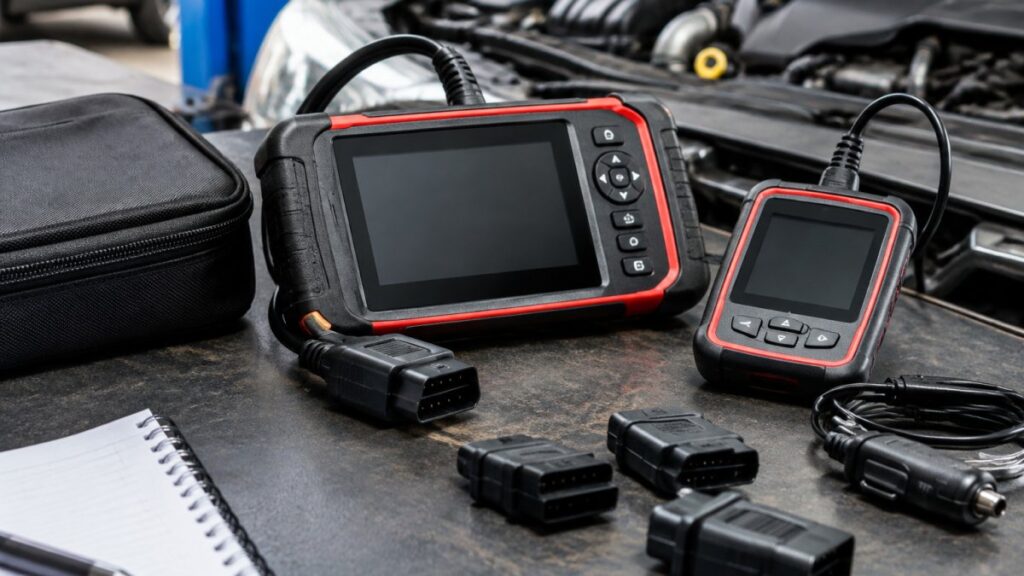
Diagnosing a modern car without the right equipment means guessing, and guessing gets expensive. Auto diagnostic tools read the fault codes a vehicle’s computers store, show live sensor data and, at the higher end, reach the individual control modules governing engine, gearbox, brakes and airbags.
Auto diagnostic tools connect to a vehicle’s onboard computer to retrieve fault codes, live data and system information. The term covers everything from basic OBD-II code readers to dealer-level scanners that programme modules.
What Auto Diagnostic Tools Actually Do
A diagnostic tool does three jobs: it reads stored trouble codes identifying which system logged a fault; it shows live data such as engine temperature, fuel trim and oxygen sensor readings; and it clears codes after a repair, though clearing without fixing the cause only hides the warning light.
A reading alone rarely solves a problem. A code such as P0300 points to random misfires, not a specific part, so the next step is always to check live data and test further. Treat the code as a starting point.
Diagnostic Tool Types and Capability Levels
Tools fall into four rough levels, and the right one depends on what you plan to do with it.
- Basic code readers read and clear generic engine codes only, suiting drivers who want to know why the check engine light is on.
- Mid-range Bluetooth scanners pair with a phone app and show live data graphs, freeze-frame data and sometimes ABS or airbag codes.
- Professional handheld and tablet tools cover most manufacturers’ systems, run bi-directional tests and support service functions such as resetting service lights.
- Dealer-level and OEM-approved tools reach every module and programme new components; they cost the most and suit workshops.
A capability chart for each class is the single best guide. If a product does not state which systems it covers, assume it reads engine codes only.
Best Auto Diagnostic Tools Ranked
This is a brand-neutral shortlist organised by capability level, not by seller. For a closer look at whether credible options exist beyond a well-known professional choice, read Is There a Real Alternative to Dynotest for Diagnostics? Where a price is not published, we say so rather than guess. Match a tool to your needs by capability class, then confirm specifics with the seller before buying.
Basic code readers (engine codes only)
Ancel AD410. A compact, rugged reader. It reads and clears generic engine codes and is best treated as a warning-light interpreter, not a diagnostic computer.
Bosch OBD 1200. Chosen as the best-value pick in a supplied review. Price and full feature detail were not available, so compare it against your budget and ask the seller which systems it reads on your make and model.
Mid-range Bluetooth scanners (live data, some extra systems)
BlueDriver Pro Scan Tool. It connects over Bluetooth and pairs with a phone app, useful for viewing live data graphs and freeze-frame data without a built-in screen. Coverage beyond engine codes is not specified, so confirm ABS and airbag support for your vehicle before relying on it. Price not stated in the research.
Innova 5610. Its exact functions, compatibility and price are not detailed in the sources. Ask the seller for the vehicle coverage list in writing.
Professional handheld and tablet tools (multi-system, bi-directional)
TopDon Phoenix Nano. An OBD-II scanner. The research does not give its price or supported functions, so confirm both before you buy.
XTOOL D8S and Autel MaxiCOM MK808Z-BT. Both appear in a 2026 comparison of OBD2 scanners.
Professional 10.1″ Automotive Diagnostic Tool, J2534 Programming (TOPDON). A tablet with J2534 programming support. J2534 is the standard pass-through interface that lets a tool reprogramme modules using manufacturer software, putting it in the professional bracket.
Specialist odometer-control modules (not code readers)
Mileage Blocker. This is the brand’s own product line, recommended only for the use it is designed for. Mileage Blocker makes UK-made mileage blocker modules for dyno testing, diagnostics, track days and off-road use, with plug-and-play installation, fitting guides, a 12-month warranty and 24/7 support. While a mileage blocker serves a different purpose from a code reader, comparing car diagnostic test costs can help clarify what to budget for fault-finding separately.
Comparison table: features, compatibility and price
| Tool | Class | Connection | Key strength | Stated price | Best for |
|---|---|---|---|---|---|
| Ancel AD410 | Basic code reader | OBD-II | Rugged, compact | Not stated | Glove-box code reading |
| Bosch OBD 1200 | Basic code reader | OBD-II | Best value in review | Not stated | Budget-conscious buyers |
| BlueDriver Pro | Mid-range Bluetooth | Bluetooth | Wireless, app-based | Not stated | Phone-based live data |
| Innova 5610 | Mid-range | OBD-II | Recommended for DIY | Not stated | Home mechanics |
| TopDon Phoenix Nano | Professional tablet | OBD-II | Overall pick in review | Not stated | Buyers wanting a top-rated scanner |
| XTOOL D8S | Professional tablet | OBD-II | 2026 comparison candidate | Not stated | Research further |
| Autel MaxiCOM MK808Z-BT | Professional tablet | OBD-II | 2026 comparison candidate | Not stated | Research further |
| TOPDON 10.1″ tablet | Professional tablet | Wired, J2534 | Programming support | £749.00 | Professional use |
| Mileage Blocker | Odometer-control module | Plug-and-play | UK-made, 12-month warranty | Check Mileage Blocker site | Dyno testing and odometer control |
Pros and cons
Watch out: a tool marketed as “full system” may still be blocked by a security gateway on newer vehicles, so confirm gateway access for your make and year before paying for a professional tablet.
How to Use an OBD2 Scanner, Step by Step
Before you start, make sure the car is switched off, the handbrake is on and the ignition key is ready. The OBD-II port is usually under the dashboard on the driver’s side.
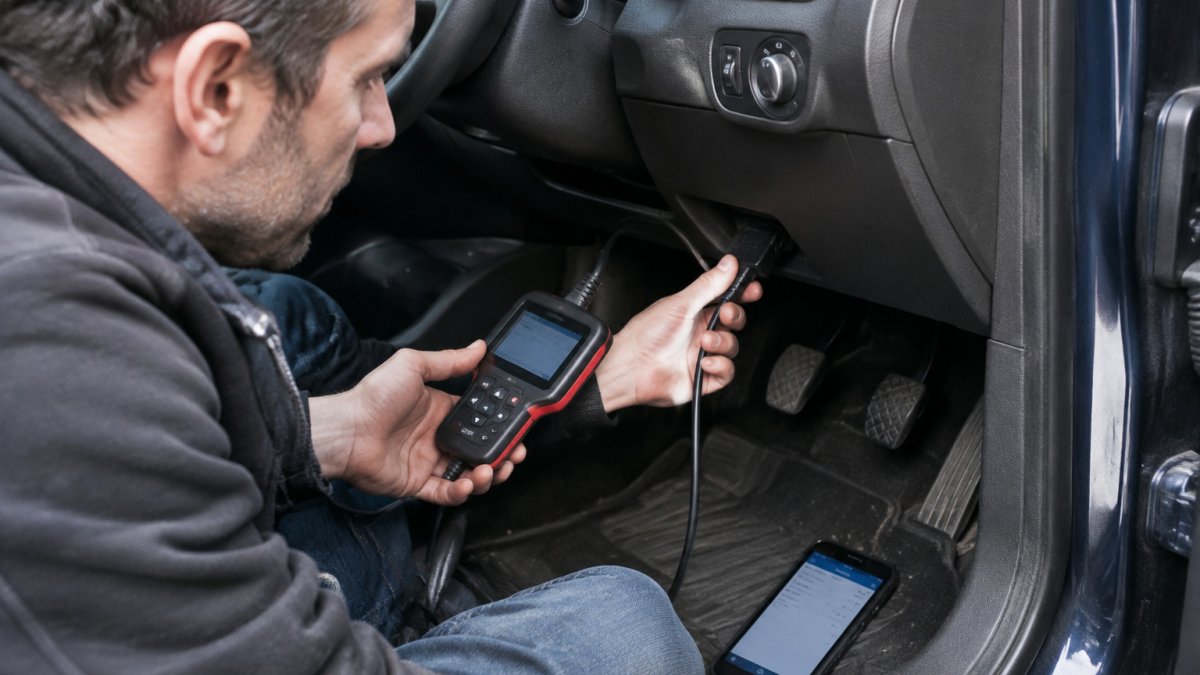
- Plug in the scanner. Push the connector firmly into the port until it seats. Some scanners power up immediately; others need the ignition turned to the on position.
- Pair it if needed. For Bluetooth models, open the app and pair the device with your phone before you turn the ignition on.
- Turn the ignition on, engine off. This powers the car’s computers without starting the engine, so the scanner can connect.
- Read the codes. Select the option to read stored codes. Write down each code exactly, including its letter prefix.
- Check live data. If you are testing a fault, look at live sensor readings with the engine running and compare them against expected ranges in a service manual.
- Clear codes only after a repair. Clearing a code before fixing the fault only removes the warning. The code will return if the cause is still present.
Compatibility, Security Gateways and Software Updates
Not every scanner reaches every system. Basic OBD-II tools read the engine and emissions systems, while ABS, airbag, immobiliser and body-control modules often need a more capable tool.
Some newer vehicles use a security gateway that blocks access to certain modules unless the tool is authorised.
Software updates matter too. A tool that is not kept up to date will miss newer codes and models. Check whether updates are free, and for how long, before you commit.
Ownership Costs, Subscriptions and Whether a Professional Tool Is Worth It
Hardware is only part of the cost. For a practical cost-benefit discussion aimed at small workshops, see Is Mileage Control Worth It for Small Tuning Shops? The upfront price is easy to compare; running costs are not, and they are where buyers most often get caught out. This section sets out the cost categories to add up and a simple way to decide whether a professional tool pays for itself.
The four cost categories
- Purchase price. The sticker price of the tool itself. Basic readers sit at the low end; professional tablets with J2534 programming sit at the high end.
- Software subscriptions and renewals. Many professional tools include an initial subscription period, often 12 or 24 months, after which coverage updates require a renewal fee. The fee varies by brand and model, so ask the seller for the renewal price in writing before you buy.
- Manufacturer software licences. For J2534 programming, you typically need the vehicle manufacturer’s own software and a subscription to its technical information portal. These are separate from the tool price and are charged per manufacturer, often per vehicle or per time period. Confirm which manufacturers you need and what their portals charge.
- Add-on modules and cables. Some tools sell extra coverage for specific makes, heavy vehicles or particular systems as add-ons. These are easy to overlook when comparing headline prices.
A worked comparison
Take two buyers over three years. A home mechanic who reads a warning light twice a year needs a basic or mid-range reader; purchase price dominates and any subscription is small or absent. A mobile technician working on several makes each week needs multi-system coverage and programming; the tool may cost several hundred pounds, and renewals plus manufacturer portal access add a meaningful sum each year.
Subscription renewal often costs more than the original tool over a five-year life, so factor renewals in from the start rather than treating them as an afterthought.
DIY versus professional: a decision framework
- Home driver, warning light only. A basic code reader is enough. Do not pay for subscriptions you will not use.
- Home mechanic, one or two cars, live data and ABS/airbag codes. A mid-range Bluetooth scanner covers most needs. Check whether updates are free and for how long.
- Mobile technician or small workshop, multiple makes. A professional tablet with multi-system coverage and service functions is justified if you bill for diagnostics. Budget for renewals and manufacturer portal access.
- Specialist programming and module replacement. J2534 support and manufacturer software are required. Confirm the portal subscription cost per manufacturer before quoting a job.
The odometer-control case
For tuners and dyno operators, the question is different. Managing odometer readings during testing is a separate job from reading codes, and it is covered by a dedicated product rather than a scanner.
Watch out: a “free updates for life” claim is only as good as the seller’s continued support, so get the update and subscription terms in writing and check the renewal price before you commit.
Choosing Your Diagnostic Tool and Booking Support
Start with the job. If you only need to read the check engine light, a basic OBD-II reader will do.
If you are not sure which level you need, ask the seller for the make, model and year of your car and check the coverage list in writing.
Best for: home mechanics and drivers who want to understand fault codes before visiting a garage.
Skip if: you only need an oil or service reset, which many cars handle through the dashboard.
Frequently Asked Questions
What is the best diagnostic tool for home mechanics?
For most home mechanics, a Bluetooth or handheld OBD-II scanner that reads and clears generic fault codes and shows live data is the sensible starting point. Check that the tool supports the protocols your vehicle uses and confirm the current price with the retailer, as the supplied research does not verify UK prices for most scanners.
Do I need a professional diagnostic tool for my car?
Not usually. A basic OBD-II reader will cover reading and clearing generic engine fault codes, which is enough for most routine checks. Professional or dealer-level tools become worthwhile when you need manufacturer-specific module coverage, programming, or diagnostics across many systems, such as ABS, airbags or immobiliser functions. For occasional use, a mid-range scanner is usually the better value.
What is the difference between an OBD2 scanner and a diagnostic tool?
An OBD2 scanner reads standardised emissions-related codes from the engine control unit through the car’s diagnostic port. A wider diagnostic tool can also access other vehicle systems, display live data across modules, run tests and sometimes perform programming. Both use the same port, but the depth of coverage and the price differ considerably. Choose based on the systems you actually need to check.
Are cheap diagnostic tools worth buying?
Cheap code readers can be worthwhile for reading and clearing basic engine fault codes, but very low-cost devices may offer limited live data, poor app support or little manufacturer coverage. Before buying, check whether the tool supports your make and model, whether updates are available, and whether software or subscription fees apply. Pricing varies by model, so confirm the current cost with the seller.

Leave a Reply